

IDAT for IB: Test Taker Handbook for St Stephen's School, Rome - Secure 360 Proctoring (APP)
This page is for the purpose of the Stephen's School (Rome) Admissions only.
1. Structure of the Test
4 sections of the test
ENGLISH - Reading & Writing
The English curriculum for IDAT assesses grammar, vocabulary, punctuation, phonics and spelling through multiple-choice questions. The writing is conducted using a keyboard with students needing to demonstrate comprehensive English skills, text type knowledge, sentence creation and variance and appropriate register, as required of the tasks. The reading texts, as appropriate to age and grade level, require students to identify themes, details, characters, literary devices and understanding.
MATHEMATICS
Students will complete between 14-24 multiple-choice math problems. They will have 2-3 questions per type of math listed on the outline of the Stage test. The test includes algebra, geometry, measurement, statistics, equations, etc., and the test will comprehensively examine students’ mathematical knowledge and problem-solving skills. For questions requiring a calculator, the calculator will appear on the screen for students to use.
GLOBAL KNOWLEDGE
The Global Knowledge assesses students’ Logic thinking abilities, including transformation, patterns, problem-solving and deductive skills, the questions are all multiple-choice questions. The logic component helps to demonstrate a student’s cognitive strengths.
The Critical Thinking section looks at student’s abilities to understand inference, interpretation, assumption, deduction and evaluate sources. These are also multiple-choice questions.
Science and Technology topics can be found here for your appropriate Stage. You will be tested at either Stage 5 or 6, depending on which year you are applying for. You should review the topics in the curriculum and be ready for some general questions about these outcomes.
CHARACTER
The character test is a positive experience for student as they self-assess their attitudes, appetites and aptitudes in communication, creative thinking, risk-taking and collaboration. The students complete easy multiple-choice and ranking activities which, when consolidated, make positive statements to help schools get to know their students and their executive skills.
2. Find Your Test Stage and Format
4 Stages based upon the year of study
Applying for Grade 9 (140 mins)
IDAT for IB Stage 5 with Stage 4 Mathematics
| Stage 5 English: Vocabulary, Grammar, Reading & Writing(45+35 mins) | Stage 4 Mathematics (25 mins) | Stage 5 Global Knowledge (15 mins) | Character (20 mins) | Critical Thinking |
|
|
|
| Assessed within the writing sections:
Assessed within Global Knowledge, critical thinking section.
|
Applying for Grade 10 (150 mins)
IDAT for IB Stage 5
| Stage 5 English: Vocabulary, Grammar, Reading & Writing (45+35 mins) | Stage 5 Mathematics (35 mins) | Stage 5 Global Knowledge (15 mins) | Character (20 mins) | Critical Thinking |
|
|
|
| Assessed within the writing sections:
Assessed within Global Knowledge, critical thinking section.
|
Applying for Grade 11 (155 mins)
IDAT for IB Stage 6 with Stage 5 Mathematics
| Stage 6 English: Vocabulary, Grammar, Reading & Writing (50+35 mins) | Stage 5 Mathematics (35 mins) | Stage 6 Global Knowledge (15 mins) | Character (20 mins) | Critical Thinking |
|
|
|
| Assessed within the writing sections:
Assessed within Global Knowledge, critical thinking section.
|
Applying for Grade 12 (155 mins)
IDAT for IB Stage 6
| Stage 6 English: Vocabulary, Grammar, Reading & Writing (50+35 mins) | Stage 6 Mathematics (35 mins) | Stage 6 Global Knowledge (15 mins) | Character (20 mins) | Critical Thinking |
|
|
|
| Assessed within the writing sections:
Assessed within Global Knowledge, critical thinking section.
|
Critical Thinking
Students will be assessed on their abilities to critically analyse, express and reflect in their writing and character section. Critical thinking is an essential skill for leadership and a highly valued part of the IDAT for IB.
The IDAT for IB incorporates a score and assessment of students’ critical thinking abilities into the writing, and character test. This assessing is done by qualitative assessors who review the Critical Thinking Descriptors and apply this criterion to students’ written replies in the test. Students will be assessed on the original thoughts and ideas they can demonstrate in their writing in the test. They should try to demonstrate their abilities to think independently, share original ideas, and express their own point of view. Please click the button to see our descriptors to understand how to achieve high scores for critical thinking.
Sample Test
There are sample tests for you to view. Please view the part that is relevant to you regarding the Stage of the test.
- Year 9 Applicants: Stage 4 Math, Stage 5 for other subjects.
- Year 10 Applicants: Stage 5 all subjects.
- Year 11 Applicants: Stage 5 Math, Stage 6 all other subjects.
- Year 12 Applicants: Stage 5 for all subjects
Note: Speaking Interview DOES NOT apply to St Stephen’s students.
3. Booking the Test, Test Date and Time
Applicants to St. Stephen’s DO NOT need to register for an IDAT account as your booking will be made through the school. Please contact St Stephen’s School, Rome for more info about booking the test and test schedule.
4. Test Requirements
Try Secure 360 Home Test Setting before Your Test Start
A reliable internet connection
Ensure the internet is well connected during the test.
Computer with HD Camera
A fully charged laptop or computer connected with external power, with an HD camera.
A Quiet and Well-lit Room
Ensure that there is no interruption during the test.
A Mobile phone & Tripod
360 system is UNABLE to run on Huawei mobile phones. Apple mobile phones’ IOS system must be updated to IOS13 or above.
- Please make sure you read through the IDAT Secure 360 Test instructions attached with your confirmation email PRIOR to your test date.
- Headsets and microphones are not required for St Stephens as there is no interview. References made to headsets do not apply to your test.
- Please note that IDAT is GDPR compliant and you DO NOT need to use VPN to secure your location or identity. If you use VPN it may affect the consistency of your internet connection.
- Please DO NOT use a mobile hotspot as your source of internet. It could severely affect the submission of your test answers.
STUDENTS must download the IDAT APP and trial the system at least 7 days prior to their test to make sure they have accurately and correctly set up the IDAT Secure 360 system. When this has been completed, students/parents must send the full name of the booking, and their IDAT test booking number with confirmation that they have been able to set up the system. Email to info@idat.org and put your test booking number as the subject.
If you fail to do this, this is considered a test cancellation and you will not be eligible for a refund.
5. Download the Application and Check the System
STUDENTS must trial the system at least 7 days prior to their test to make sure they have accurately and correctly set up the IDAT APP and Secure 360 system.
Please click on one of the following to view the instructions. We recommend you open these on a device or mobile phone you WILL NOT use on test day. To trial the set up you need your computer and a secondary device free and ready to use for the test set up, and no one being used to view instructions.
Have Your Test Devices Ready
Find Your Link in Your Account to Download the IDAT APP
Complete the Trial Setup
6. Preparing Your Test
Find the tips that can help you do well in the test.
Get to know the IDAT for IB - St Stephen's School Admission Test
Please refer to the subject curriculum on this page for detailed testing areas and expected outcomes.
Become familiar with the structure of the test, including:
- Question Types
- Things to Remember
- Useful English Vocabulary
- Frequency Sentence Pattern
- Example Questions
Click each section to learn useful tips. Please note that GLOBAL KNOWLEDGE will include logic, critical thinking, science and technology.
7. On Your Test Day
Please make sure your read through this part before the test day.
IMPORTANT
- IDAT Secure 360 students should set up their computer and smart device at least 20 MINUTES before test time.
- You must REMOVE everything from your area of sight and reach that could assist with the test.
You MUST enter the test page within 30 minutes after your scheduled test starts, otherwise, your test - will be cancelled.
- You MUST pre-trial the Secure 360 home test setting prior to your scheduled test time. Failure to connect test and proctoring devices as instructed, will negate test results. For any technical questions, please contact the IDAT team as soon as possible.
Have Your Test Devices and IDAT APP Ready
Log In and Set Up for Your Test
Start Your Test
STEP 1: Have Your Test Devices Ready
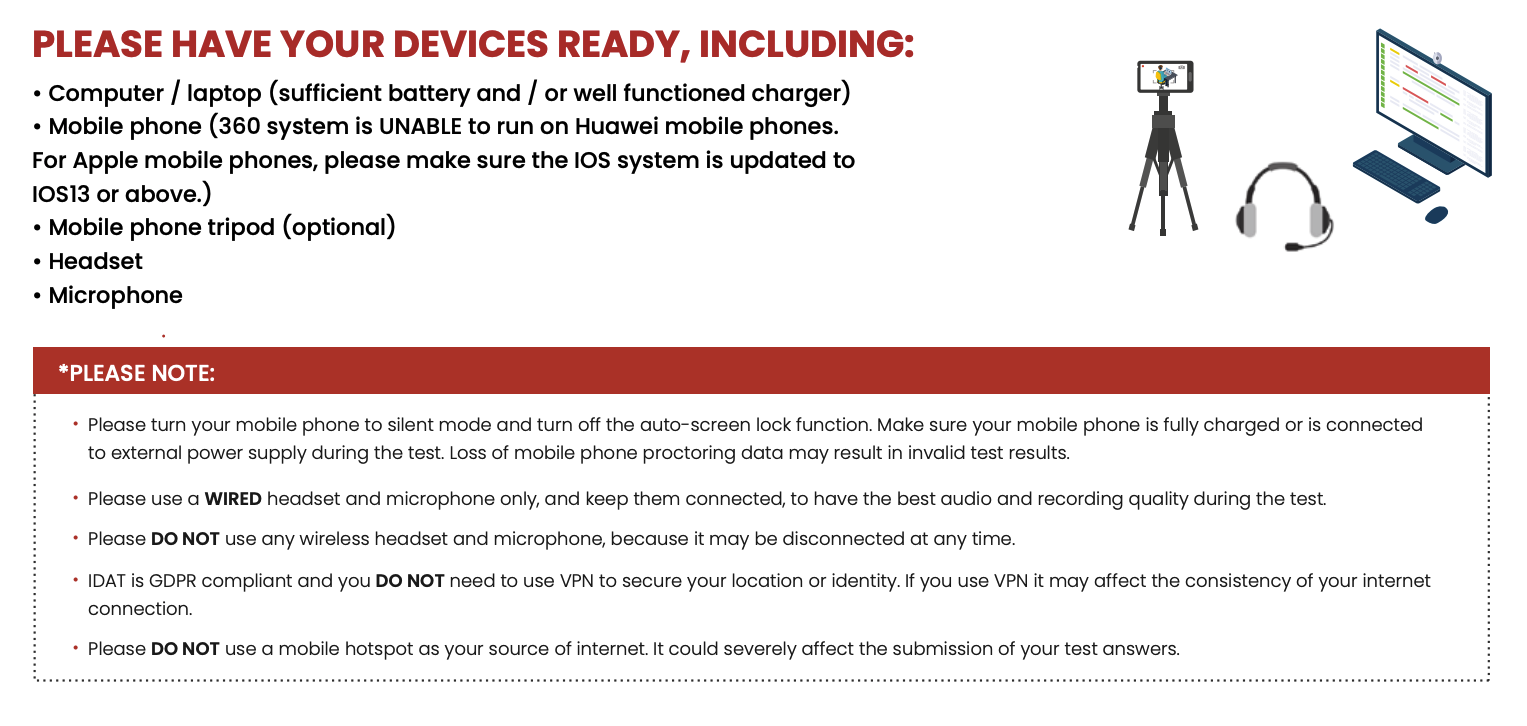
⚠️ If your IDAT APP is NOT READY for the test, please click the following written instructions to download and open the IDAT APP.
STEP 2: Open the IDAT APP, Log In & Set Up for IDAT Test
Setting Up Your IDAT 360 Test
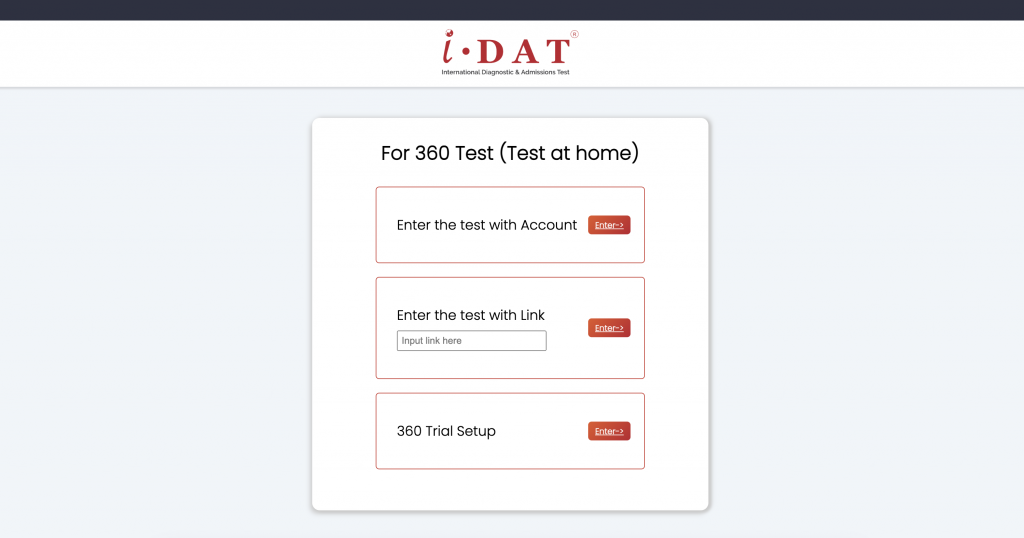
Once you successfully open the IDAT App, you will be directed to the 360 Test entry page.
1: Log In and Access Your Test
- Click “Enter the Test with Account“ to begin setting up your devices.
- Log in using your IDAT account, ensuring it is the same account used to register for the test.
- Navigate to: Home Page > My Booking > Find Your Registered Test, then click “Start 360 Test“ to proceed.

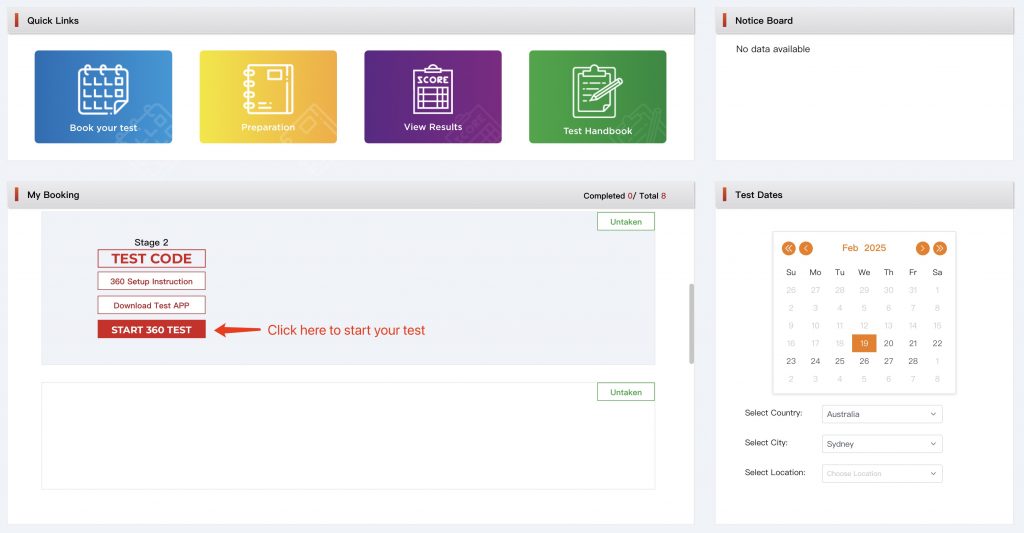

2: Set Up Your Proctoring Devices
- Computer Camera: Main proctoring camera.
- Mobile Device Camera: Secondary proctoring camera.
⚠️ Important for Apple Users:
If you see an alert on your mobile device stating,
“Connected to Your MacBook/Mac: You can disconnect to remove this iPhone/iPad from the Mac camera list,”
please tap “DISCONNECT” to stop using your iPhone/iPad as the main proctoring camera.
Computer (Main Test Device)
- The camera will activate automatically. If not, grant Camera and Microphone access to the IDAT App:
- Mac: System Settings > Privacy & Security > Camera/Microphone > Allow IDAT to access
- Windows: Windows should automatically allow access to the cameras. You just need to accept. If it does not, you will need to adjust your security settings.
- If you see the below icon on your main camera, it means multiple cameras are detected (including potential virtual cameras you may not be aware of), click the “Set Main Camera” in the upper-left corner of the IDAT APP to select your main camera.
- The camera will activate automatically. If not, grant Camera and Microphone access to the IDAT App:

- Mobile Device (Proctoring Camera)
- Scan the QR code on the setup page to activate your mobile device as the secondary proctoring device.
- Position your mobile device appropriately for proctoring.
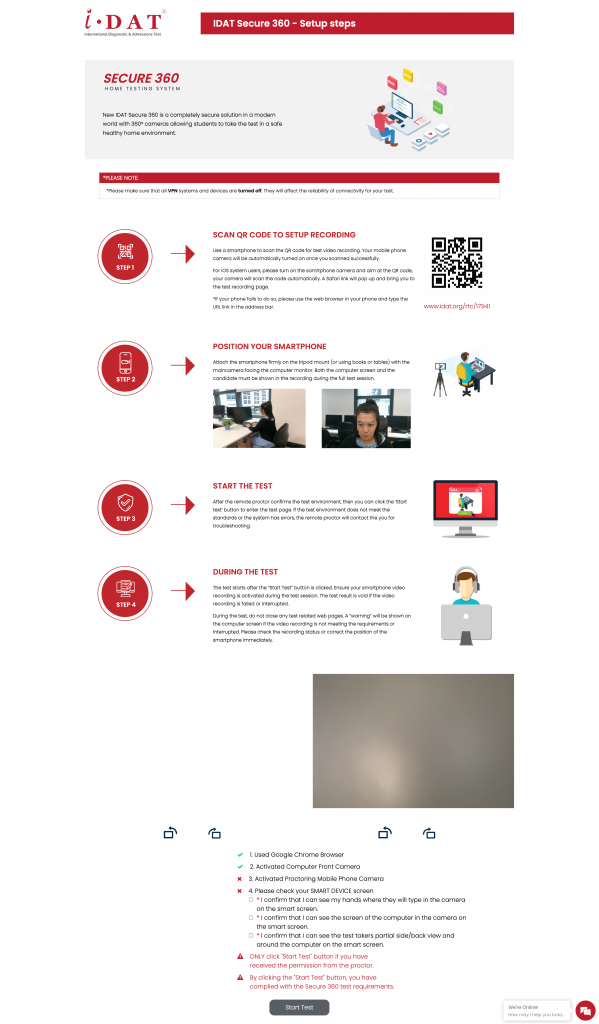
3: Start Your Test
Once the online proctors confirm your test devices are correctly set up, you may begin your test.
If you have any questions, please reach out via the chatbox on the page (bottom-right corner).
8. During Your Test
The test taker MUST follow Secure 360 test rules.
The test has 4 sections: English, Mathematics, Global Knowledge and Character. Mathematics / Global Knowledge / Character are multiple choice only. The English part also includes writing. You are encouraged to write as much as possible, but please be aware of the time remaining.
The remaining time will be shown on the screen. Once you complete the sections, you may jump to the next part. Keep an eye on the timer as you this is your responsibility.
For each question that requires calculation, the test system will automatically turn on the calculator function. Be careful not to turn it off since it will not be displayed for the second time.
Test Rules
The test taker MUST follow Secure 360 test rules. You must not engage in any form of deception or malpractice which may damage the integrity or security of the IDAT. The test taker who cheats or attempts to cheat will not be eligible for a refund for any fees paid. The student may be banned from taking future tests.
• Must be alone in a quiet, well-lit room, ensure that there is no interruption or noise during the test.
• Face, ear and head must be visible and unobscured, no heavy make up, otherwise you may fail the facial recognition.
• Blank paper and pencil are allowed. MUST be approved by the online proctor.
• Eating is not allowed, but you can drink water.
• You will not be allowed to record your responses or questions by using any device, copy work from anywhere, disrupt the test, or attempt to alter data or results of the test.
• Do not look away from the screen, you must keep staying on your seat during the test, you are not permitted to leave the room.
• You cannot use any other electronic devices during the test. Once found, your test will be CANCELLED.
• Your proctor can hear you during the test, however they are only able to communicate with you by sending you messages online.
• You MUST not open any other web pages during the test, the system will give you a warning if you are off your test page more than 10 seconds. Test will be CANCELLED if you receive 3 warnings.
• Any student or family member of the student engaging in malpractice will not be allowed to complete the test.
The proctor can see and hear you through the proctoring cameras during the test, if any of the FRAUD BEHAVIOUR is caught and the proctor judges the test is invalid, a report will be sent to the IDAT office, and an official notice will be sent to the test taker. No re-examination or refund request will be granted.
Unforeseen Circumstances
1. Why can’t I open the testing system?
Please make sure you have used the IDAT APP only and it has been updated to the latest version.
2. What if I close the testing system accidentally?
Please re-open the test website and log back in. The system will bring you back to the question of where you dropped out. Countdown on times will NOT be stopped, therefore, please log back in as soon as possible.
3. What if I click the backward button accidentally?
You can NOT go back to your previous question. Once you have submitted your answer you will NOT be able to see it again. If you click the backward button, just REFRESH the page and you will be fine.
4. What if my screen is frozen and does not respond to anything?
It could be caused by fluctuations in the internet connection; however, it rarely happens during the test. If your screen is frozen:
• In the writing section, refresh the page and click “submit” again.
• All other sections, refresh the page, re-select your answer and then submit again.
If any other accidents, uncontrollable factors occur, please contact your proctors IMMEDIATELY via Chat Box on the test page.
WHAT YOU NEED TO KNOW
The proctor can see and hear you through the proctoring cameras during the test, if any of the fraudulent behaviour is caught and the proctor judges the test is invalid, a report will be sent to the IDAT office, and an official notice will be sent to the test taker. No re-examination or refund request will be granted.
9. After the Test
Test results will be shared with St. Stephen’s School and NOT with individual families.